Designing a Production-Representative Microsoft Defender for Identity Lab
Designing a Production-Representative Microsoft Defender for Identity Lab
Most Microsoft Defender for Identity labs are built with good intentions and weak assumptions.
They usually have a domain controller, a user account, one or two simulated identity attacks, and an expectation that alerts should fire immediately.
That kind of lab may be useful for checking whether the portal receives a signal.
It is not enough to understand how MDI behaves in production.
A truthful MDI lab should not be designed as a playground to fire alerts on demand. It should be designed as a tool to understand identity telemetry, sensor coverage, investigation quality, and detection confidence.
The purpose of this lab design is not to teach attack execution. It is not a red-team walkthrough. It is not a list of commands.
The purpose is architectural:
How do we build a lab that produces credible identity telemetry and realistic Defender XDR investigations?
The answer starts with one principle:
MDI does not detect “tools.”
MDI observes identity behavior through identity infrastructure.
That means the quality of the lab depends less on how many simulated actions you run and more on whether the lab contains the identity roles, telemetry paths, baselines, and investigation context that exist in real environments.
A good MDI lab should help answer questions like:
- What did MDI actually see?
- Which sensor observed the activity?
- Was the source identity resolved correctly?
- Did the behavior touch a monitored identity system?
- Was the activity normal, abnormal, or simply new?
- Did Defender XDR correlate identity evidence with endpoint evidence?
- Can the SOC explain the incident from evidence instead of assumptions?
- Are response actions understood correctly?
That is the difference between a lab that produces alerts and a lab that teaches how MDI works.
1. Why Most MDI Labs Fail to Represent Reality
A lot of MDI labs fail because they are built around alert generation instead of identity architecture.
The lab becomes a simple pattern:
1
2
3
4
5
One DC
One user
One workstation
One simulated technique
Expected alert
That may look clean, but real environments are not clean.
Production identity environments contain multiple domain controllers, service accounts, privileged workstations, sync servers, legacy authentication, normal administrative behavior, noisy applications, baseline patterns, incomplete visibility, and hybrid identity dependencies.
If the lab does not represent at least some of that complexity, it teaches the wrong lessons.
Single DC labs
A single domain controller lab is useful for basic installation validation.
It is not enough to understand production MDI behavior.
In real environments, authentication does not always hit the domain controller you expect. Clients may authenticate against different DCs depending on site topology, DNS, availability, load, and domain behavior.
If your lab has only one DC, you never experience a core MDI reality:
Visibility depends on which identity infrastructure system observes the activity.
A single DC lab can make MDI look simpler than it is.
It hides questions like:
- Are all DCs monitored?
- Does the alert identify which DC observed the behavior?
- What happens if one DC has a healthy sensor and another does not?
- Does activity distribute across multiple identity servers?
- Are detection stories complete when coverage is partial?
A production-representative lab should include more than one domain controller because MDI coverage is an architectural property, not just an installation state.
No Entra Connect
Another common mistake is building an “MDI lab” with only Active Directory.
That misses the hybrid identity reality most enterprises actually live in.
Microsoft Entra Connect is not just a sync utility. It is part of the identity control plane. It connects on-premises AD identity state with Microsoft Entra ID. If it is compromised or misconfigured, the impact may cross from on-premises identity into cloud identity.
A lab without Entra Connect teaches a DC-only mental model.
That model is incomplete.
A production-representative MDI lab should include a monitored Entra Connect server and treat it as Tier 0 infrastructure.
The point is not to simulate every sync attack path. The point is to teach the architectural truth:
Tier 0 is bigger than domain controllers.
No baseline traffic
Many labs are built, attacked, and judged immediately.
That creates false expectations.
MDI uses a mix of deterministic detections and behavioral baselines. Some behaviors may be suspicious immediately because they match known malicious patterns. Others require MDI to learn what is normal for accounts, computers, protocols, and domain controllers.
If a lab has no normal activity, then abnormal activity has no realistic background.
The lab becomes artificial.
Baseline traffic matters because identity detection is contextual.
A suspicious LDAP query from a normal workstation means something different from a broad LDAP query from a known admin tool. A privileged logon from a PAW means something different from the same privileged logon from a user workstation.
Without baseline activity, the lab cannot teach that distinction.
Single user testing
Testing everything with one account is another false-lab pattern.
Real identity environments have different identity roles:
- standard users,
- privileged users,
- service accounts,
- sync accounts,
- honeytokens,
- sensitive accounts,
- workstation computer accounts,
- server computer accounts.
If the lab uses one user for everything, MDI cannot demonstrate meaningful identity context.
The SOC also cannot learn how to distinguish between normal user behavior, administrative behavior, service behavior, and suspicious identity behavior.
A production-representative lab needs identity variety.
Not hundreds of users.
Just enough identity roles to show that identity context matters.
Immediate alert expectations
A bad lab teaches people to ask:
“Did the alert fire?”
A good lab teaches people to ask:
“Was the behavior visible, explainable, and correlated?”
Those are different questions.
MDI is not a button where every action produces an alert. Some detections need baselines. Some need multiple signals. Some require specific sensor visibility. Some depend on protocol behavior. Some become valuable only when Defender XDR correlates them with endpoint or cloud activity.
Immediate alert expectations lead to bad conclusions:
- “MDI missed the attack.”
- “The lab is broken.”
- “The product is unreliable.”
- “We need to lower thresholds permanently.”
- “Let’s exclude noisy systems.”
Sometimes those conclusions are true.
Often they are premature.
A better lab design helps explain why detections do or do not trigger.
No PAW differentiation
Privileged Access Workstations are important because they create a clean administrative pattern.
If the lab has privileged activity only from random user workstations, it teaches weak operational hygiene.
A PAW allows the lab to show contrast:
1
2
3
4
5
Normal admin behavior:
Privileged account → PAW → Domain Controller / identity infrastructure

Suspicious admin behavior:
Privileged account → normal workstation → broad directory access / sensitive change
That contrast is valuable.
MDI detection quality improves when the environment has clear identity and administrative patterns. If every admin action comes from everywhere, suspicious admin behavior is harder to reason about.
A lab should make this visible.
No identity posture features
Some labs focus only on alerts and ignore posture.
That misses a major part of MDI’s value.
MDI is not only about detecting active identity abuse. It also helps expose identity risks and attack paths:
- sensitive accounts,
- honeytokens,
- lateral movement paths,
- risky delegation,
- unmonitored identity infrastructure,
- privileged group exposure,
- and identity security posture recommendations.
If a lab does not include sensitive entity tagging, honeytokens, and basic identity posture context, it cannot demonstrate how MDI supports proactive identity defense.
Treating MDI as a log collector
MDI is not a general-purpose log collector.
It is not Sentinel.
It is not DLP.
It is not endpoint telemetry.
It is not a user surveillance tool.
MDI collects and analyzes identity-relevant signals from identity infrastructure. It uses those signals to detect identity threats, enrich investigations, and support posture analysis.
If the lab is built as if MDI is just a domain controller log collector, the architecture will be wrong from the beginning.
2. Lab Design Principle: MDI Observes Identity Infrastructure, Not “Attack Tools”
A production-representative MDI lab should be designed around identity roles, not attack frameworks.
That is the most important principle.
The question is not:
“Which tool can I run to trigger alerts?”
The better question is:
“Which identity behavior should exist in the environment, and which infrastructure should observe it?”
MDI does not care about a tool name in isolation. It cares about the identity-plane behavior produced by the activity:
- authentication,
- authorization,
- LDAP queries,
- Kerberos ticket requests,
- NTLM usage,
- SAM-R enumeration,
- directory changes,
- replication behavior,
- service account usage,
- privileged group modification,
- and interactions with sensitive identity infrastructure.
That is why the lab should be built around identity roles:
- domain controllers,
- Entra Connect,
- user workstations,
- privileged access workstation,
- controlled telemetry workstation,
- service accounts,
- sensitive accounts,
- honeytokens,
- and monitored endpoints.
The goal is not attack volume.
The goal is telemetry quality.
Why telemetry quality matters more than attack volume
Running many simulated actions against a poorly designed lab produces noise, not understanding.
A high-quality lab should make evidence explainable:
- Which identity performed the action?
- Which device generated the activity?
- Which identity server observed it?
- Which protocol was involved?
- Was this normal for that account or device?
- Did the behavior align with a known attack phase?
- Did Defender XDR correlate it with endpoint evidence?
- Can Advanced Hunting validate the story?
If the answer is unclear, more alert volume will not fix the lab.
Better architecture will.
Why the lab generates data first and investigates later
A realistic MDI lab should generate normal activity before demonstrations or investigations.
That includes:
- user sign-ins,
- normal workstation authentication,
- expected admin activity from the PAW,
- directory access from legitimate systems,
- service account behavior,
- and routine endpoint telemetry.
This matters because identity detection is contextual.
MDI needs to understand what normal looks like.
Defender XDR needs enough entity context to build meaningful incidents.
Analysts need timeline data to compare normal and suspicious behavior.
A lab where the first meaningful activity is suspicious activity is not production-representative.
It is an empty room where every sound seems loud.
Why live attacks are intentionally excluded
This lab is designed for investigation quality, not live attack execution.
That matters for safety, repeatability, and professionalism.
A controlled lab can contain prepared identity telemetry and pre-generated incidents without turning the blog, workshop, or learning environment into an offensive walkthrough.
The point is to understand MDI behavior:
- what was visible,
- what was correlated,
- what was missed,
- what required baseline,
- what required sensor coverage,
- and what the SOC can explain.
A good lab does not need live attacks during a demonstration to teach identity detection.
It needs credible evidence.
3. Identity Infrastructure Coverage in the Lab
The lab architecture should represent the identity plane, not just a domain controller.
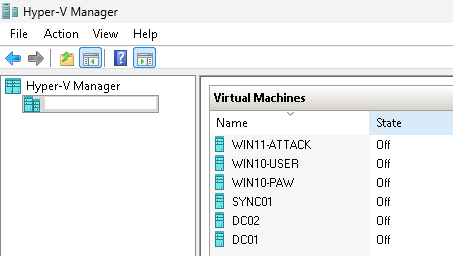
A strong production-representative lab includes:
- two domain controllers,
- one DC with classic MDI sensor v2.x,
- one DC with MDI sensor v3.x via Defender for Endpoint,
- a monitored Microsoft Entra Connect server,
- a standard user workstation,
- a privileged access workstation,
- a controlled telemetry workstation,
- Microsoft Defender for Endpoint onboarding across all machines,
- MDI Recommended Test Mode,
- healthy sensors,
- gMSA or DSA for directory enrichment,
- sensitive entity tagging,
- honeytokens,
- service account classification,
- and response permissions.
The purpose is not to make the lab big.
The purpose is to make the lab honest.
Why two domain controllers matter
Two DCs introduce a basic production reality:
Identity traffic can be observed by different domain controllers.
This allows the lab to demonstrate that MDI visibility depends on sensor coverage across identity infrastructure.
With two DCs, the lab can show:
- sensor health differences,
- identity activity observed by different DCs,
- investigation evidence tied to a specific domain controller,
- why partial coverage creates blind spots,
- and why “we installed MDI on the main DC” is not a mature design.
A two-DC lab is still small.
But it is much closer to reality than a one-DC lab.
Why mixing sensor v2.x and v3.x matters
Including one classic v2.x sensor and one v3.x sensor via Defender for Endpoint is useful because many real environments are in transition.
Some customers still operate classic sensors.
Others are moving toward the MDE-integrated v3.x model.
A lab that includes both helps consultants and engineers understand the design differences without turning the article into an installation guide.
At an architectural level, this helps explain:
- direct sensor installation versus MDE-based activation,
- the dependency on Defender for Endpoint for v3.x,
- differences in operational ownership,
- response identity considerations,
- health monitoring differences,
- and migration planning.
This matters because sensor model is not just a deployment detail.
It affects ownership, troubleshooting, response expectations, and sometimes detection coverage assumptions.
Why Entra Connect must be included
Entra Connect is the hybrid identity bridge.
Ignoring it creates a false lab.
In production, identity compromise rarely respects the boundary between “on-prem” and “cloud.” Attackers may abuse on-premises identities to influence cloud access, and hybrid configuration often becomes part of the attack path.
A monitored Entra Connect server helps the lab teach several important lessons:
- sync infrastructure is Tier 0,
- hybrid identity incidents are not DC-only,
- on-premises compromise can affect cloud identity posture,
- service and sync accounts need special treatment,
- Defender XDR investigations should consider both AD and Entra context.
The lab does not need to simulate every hybrid attack path.
It only needs to make the hybrid control plane visible.
Why PAW activity must exist and look different
A Privileged Access Workstation gives the lab a clean administrative pattern.
This matters because MDI detections often rely on context.
If privileged work happens from everywhere, it becomes difficult to explain what “abnormal” looks like.
The PAW gives the lab a controlled baseline:
1
2
Privileged account + PAW + expected admin target = normal admin pattern
Privileged account + user workstation + unusual identity activity = suspicious pattern
This is useful for SOC analysts because real investigations often depend on understanding whether privileged activity came from an expected device.
A PAW in the lab also reinforces a core Zero Trust idea:
Administrative behavior should be isolated, intentional, and explainable.
Why baseline user activity must exist
A standard user workstation is not just filler.
It creates normal authentication behavior.
That baseline helps the lab show the difference between:
- normal user sign-in,
- routine access to domain resources,
- normal device authentication,
- abnormal LDAP discovery,
- suspicious Kerberos behavior,
- and privileged identity misuse.
Without a normal user baseline, every event looks special.
With a baseline, analysts can compare.
That comparison is where detection engineering becomes real.
Why a controlled telemetry workstation exists
The controlled telemetry workstation has a specific purpose:
generate identity telemetry before demonstrations in a repeatable and safe way.
It is not a “hacker box” in the blog narrative.
It is a controlled source of identity behavior.
That distinction matters.
The lab should be able to produce prepared telemetry for:
- reconnaissance-like identity queries,
- abnormal authentication patterns,
- suspicious identity relationships,
- timeline evidence,
- XDR correlation,
- and hunting validation.
But the blog should not provide offensive commands or tool instructions.
The value is not in how the behavior is generated.
The value is in how the behavior appears in MDI and Defender XDR.
4. Baseline vs Suspicious Identity Behavior
A truthful MDI lab needs both normal and suspicious identity behavior.
Not because the lab should “attack itself,” but because MDI is designed to reason about identity behavior in context.
A lab without normal behavior cannot teach abnormal behavior properly.
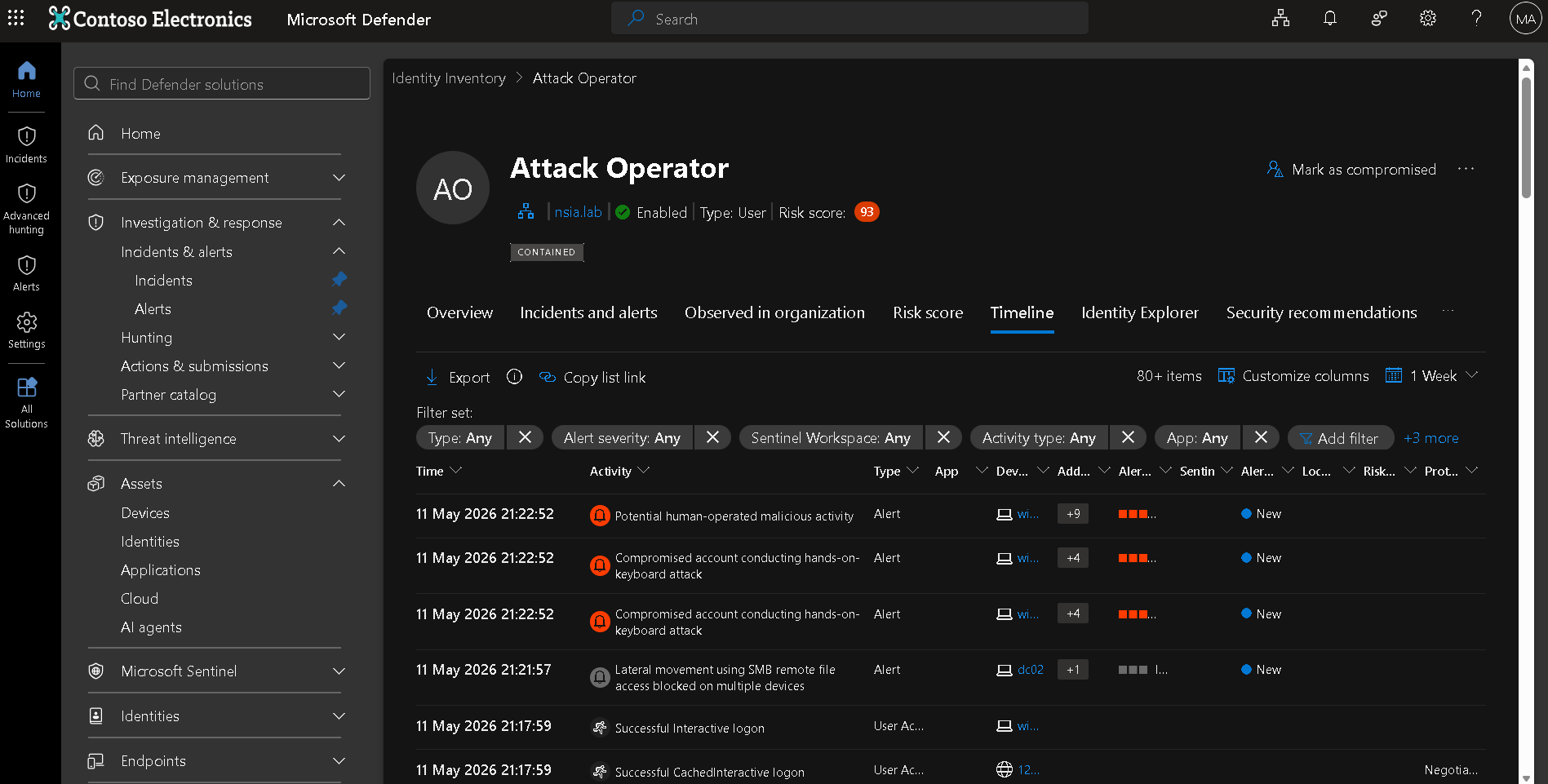
Normal authentication flows
Normal authentication should include:
- standard user sign-ins,
- workstation authentication,
- access to domain resources,
- expected Kerberos and NTLM activity,
- routine domain controller interactions,
- and normal account usage patterns.
This gives MDI and Defender XDR a background.
It also helps analysts understand the difference between evidence and anomaly.
For example, a Kerberos event is not suspicious by itself.
Kerberos is normal.
What matters is the pattern, source, target, identity, timing, and relationship to other activity.
Normal directory access
Some directory access is normal.
Applications query AD.
Admin tools query AD.
Workstations discover domain resources.
Management systems enumerate objects.
A useful lab should include some legitimate directory interaction so analysts do not fall into the trap of thinking:
LDAP equals attack.
That is not how production works.
The detection question is:
Is this directory access expected from this source, identity, and context?
Normal PAW admin behavior
The PAW should generate clean administrative behavior.
That gives the lab an expected pattern for privileged activity.
This helps demonstrate why administrative hygiene matters for detection.
If the PAW performs expected admin tasks and a normal workstation later performs unusual privileged activity, the difference is explainable.
That is the kind of comparison SOC analysts need.
Abnormal identity behavior later
After normal patterns exist, the lab can introduce prepared abnormal identity behavior.
The point is not to run live attacks during a demo.
The point is to create evidence that lets analysts reason through identity misuse.
Examples of abnormal identity behavior at a conceptual level include:
- unexpected directory enumeration,
- unusual authentication source,
- suspicious privileged access,
- abnormal service account usage,
- honeytoken interaction,
- suspicious sensitive group activity,
- or identity behavior inconsistent with the baseline.
The important part is not the technique name.
The important part is the contrast:
1
2
3
4
5
6
7
8
9
Normal identity pattern
        ↓
Abnormal identity behavior
        ↓
MDI signal
        ↓
Defender XDR correlation
        ↓
Investigation and explanation
Behavioral detections vs deterministic detections
This lab should also teach that not all MDI detections behave the same way.
Some detections are deterministic. They can trigger because the behavior maps strongly to a known malicious pattern.
Others are behavioral. They depend on baselines.
That means early lab testing can produce uneven results if expectations are not managed.
A good lab should explicitly teach:
- some detections may trigger quickly,
- some need baseline maturity,
- some need repeated behavior,
- some need specific sensor visibility,
- some need Windows events or ETW,
- some become meaningful only inside an XDR incident.
This is why the lab is not an “alert vending machine.”
It is a detection-understanding environment.
5. Why the Lab Is Designed Around Investigation, Not Alerts
A bad MDI lab asks:
“How many alerts did we trigger?”
A good MDI lab asks:
“Can we explain the identity behavior from evidence?”
That is the difference.
Alerts are useful, but they are not the only output.
A production-representative lab should support:
- Defender XDR incidents,
- Alert Story,
- Alert Graph,
- Identity Timeline,
- entity investigation,
- Advanced Hunting validation,
- response action interpretation,
- posture review,
- and SOC decision-making.
Alerts alone are not the goal
An alert title is not an investigation.
An alert title tells you what MDI thinks may have happened.
The investigation explains:
- who was involved,
- where the activity started,
- which device generated it,
- which identity infrastructure observed it,
- which protocol was used,
- whether the identity is sensitive,
- whether the source is expected,
- whether related endpoint evidence exists,
- whether the behavior continued,
- and what containment is appropriate.
A lab that only proves alert generation does not teach this.
XDR incidents
Defender XDR incidents are where MDI becomes operational.
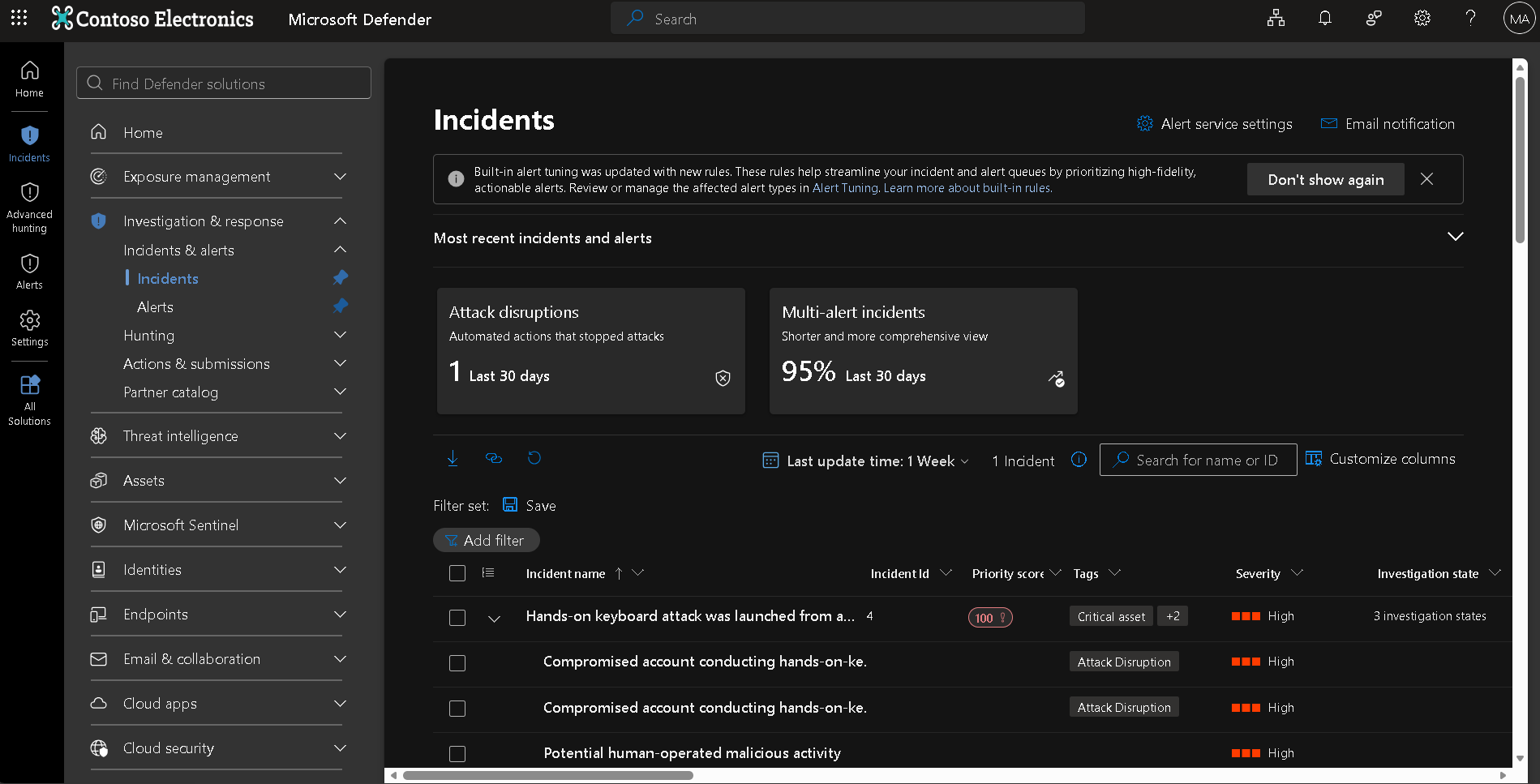
In a good lab, MDI alerts should not be viewed only as isolated identity events.
They should be correlated with endpoint context from Defender for Endpoint and other available Defender signals.
This lets analysts understand the broader story:
1
2
3
4
5
6
7
Endpoint signal
        ↓
Identity signal
        ↓
Correlated incident
        ↓
Investigation workflow
That is why all machines in the lab should be onboarded to Defender for Endpoint.
Not because MDE replaces MDI.
Because MDE gives device context that helps explain identity behavior.
Alert Story
Alert Story helps turn identity telemetry into a sequence.
This is especially useful in workshops and SOC enablement because identity alerts are often abstract.
A process tree is easy to understand.
Identity protocol behavior is less obvious.
Alert Story helps show how the identity activity unfolded over time.
Alert Graph
Alert Graph helps explain relationships.
In identity incidents, relationships matter:
- user to device,
- device to DC,
- account to group,
- identity to sensitive asset,
- source to target,
- account to lateral movement path.
The graph helps analysts understand scope and blast radius.
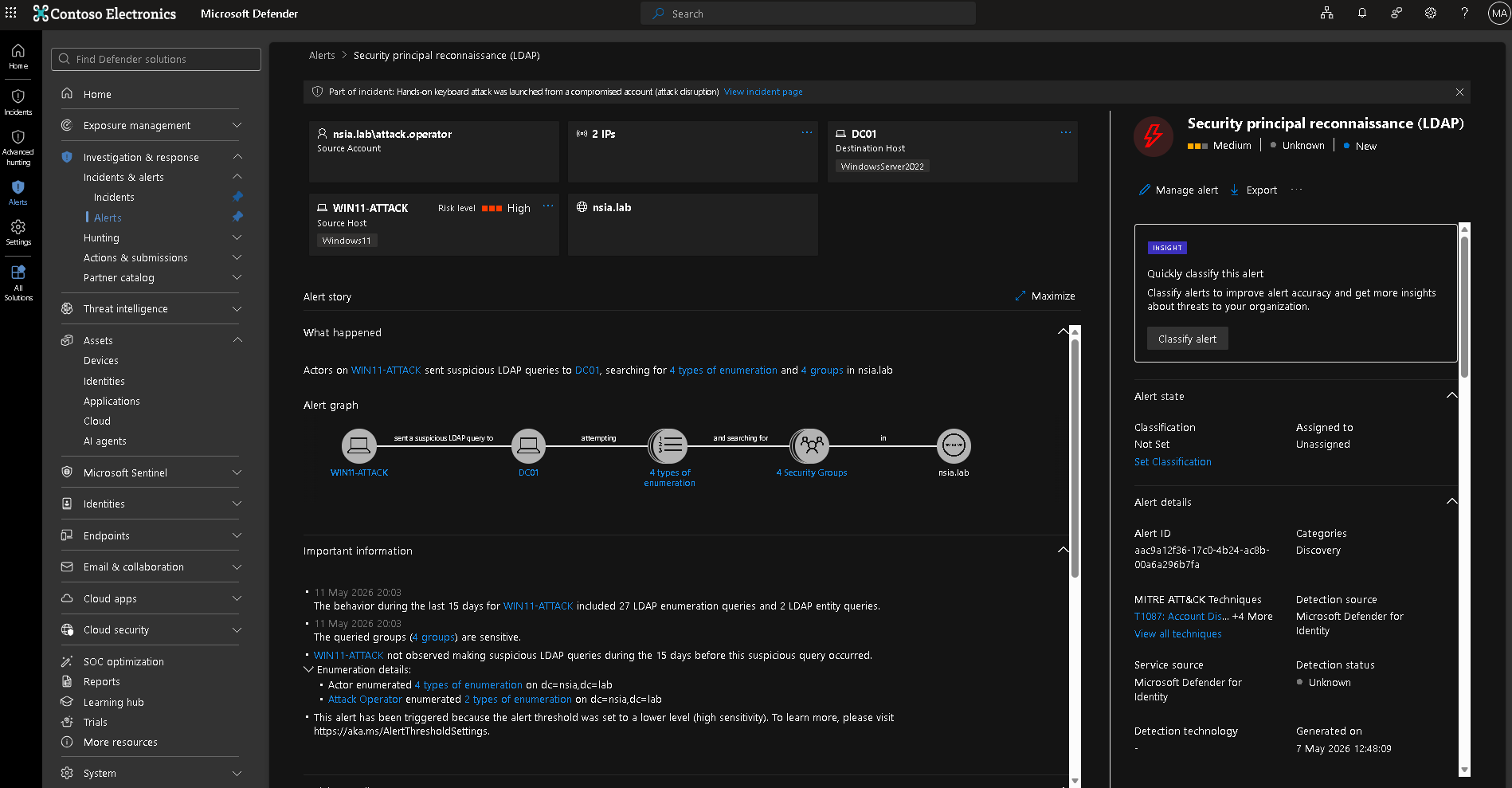
Identity Timeline
The Identity Timeline is the backbone of identity investigation.
It lets analysts inspect what an identity did before and after an alert.
This is where the lab should show:
- normal baseline activity,
- suspicious activity,
- failed attempts,
- successful authentication,
- directory changes,
- and related identity events.
The timeline is often where the SOC moves from “alert title” to “understood behavior.”
Advanced Hunting validation
KQL should not be used in the lab as a magic trick.
It should be used to validate identity behavior.
Good hunting questions include:
- Did this account authenticate elsewhere?
- Did this workstation query sensitive objects?
- Did this identity touch multiple systems?
- Did any sensitive group change?
- Is the behavior isolated or repeated?
- Does the same pattern appear across other accounts?
KQL is not the lab goal.
KQL is a way to explain and verify what MDI and Defender XDR are showing.
The core statement
This is not a detection-testing lab.
It is an investigation-quality lab.
That distinction changes the entire design.
A detection-testing lab optimizes for alert firing.
An investigation-quality lab optimizes for evidence, context, correlation, and explanation.
6. Hybrid Identity Reality
Hybrid identity changes the lab.
A DC-only lab can teach AD authentication.
It cannot teach hybrid identity risk.
Most enterprises are not purely on-premises. They synchronize identities, operate cloud applications, use Entra ID, and depend on identity bridges between local and cloud environments.
That is why Entra Connect matters.
Why Entra Connect exposure matters
Entra Connect has privileged visibility into identity state.
It participates in synchronization between Active Directory and Microsoft Entra ID.
If it is ignored, the lab misses one of the most important realities in hybrid identity:
identity compromise can cross control planes.
A compromised or misused sync server can affect how identity state is represented beyond on-premises AD.
Even if the lab does not simulate that compromise, it should include Entra Connect as monitored Tier 0 infrastructure.
The architectural lesson is the point.
Hybrid identity incidents are not DC-only
Many customers think MDI equals domain controller monitoring.
That is too narrow.
A real hybrid identity incident may involve:
- a workstation,
- a user account,
- a privileged identity,
- a domain controller,
- Entra Connect,
- an Entra ID account,
- cloud sessions,
- SaaS access,
- and endpoint telemetry.
MDI contributes the on-premises and hybrid identity signal.
Defender XDR correlates it with other workloads.
That is the operating model the lab should demonstrate.
Blind spots when sync servers are ignored
If Entra Connect is not monitored or treated as Tier 0, the lab hides important risks:
- sync accounts may be overlooked,
- hybrid identity paths may be misunderstood,
- cloud identity impact may be underestimated,
- SOC analysts may investigate DCs only,
- response planning may ignore synchronization delay or cloud session state,
- and identity architects may miss Tier 0 dependencies.
That is dangerous because attackers do not respect product boundaries.
A lab should teach the defender not to respect those boundaries either.
Tier 0 is bigger than domain controllers
This is one of the most important messages in the lab.
Tier 0 includes systems and identities that can control or materially influence identity security.
That includes:
- domain controllers,
- AD CS,
- AD FS,
- Entra Connect,
- privileged admin workstations,
- sensitive service accounts,
- sync identities,
- and other systems that influence authentication, authorization, certificates, federation, or synchronization.
The lab does not need to contain everything.
But it should contain enough to teach the principle:
Domain controllers are central, but they are not the whole identity plane.
7. Response and Containment Design in the Lab
A production-representative lab should include response design.
Not because the blog should provide procedural steps.
Because response interpretation is one of the most misunderstood parts of identity security.
MDI and Defender XDR can support response actions such as:
- disabling a user,
- forcing password reset,
- revoking sessions,
- marking a user as compromised,
- and tracking actions in the Defender portal.
But those actions must be understood carefully.
Why response permissions are preconfigured
Response permissions should be preconfigured in the lab so analysts can understand what response looks like during investigation.
If response is not configured, the lab teaches detection without containment.
That is incomplete.
However, response permissions should not be treated as “buttons to click casually.”
They should be governed.
A good lab should help explain:
- who can perform response actions,
- what each action changes,
- what each action does not change,
- where the action is tracked,
- how rollback is handled,
- and how identity engineering is involved.
Disabling an account does not mean instant disappearance
This is a common customer surprise.
Disabling a user account does not instantly remove every trace of that identity from the environment.
A disabled account may still appear in:
- historical logs,
- Defender XDR evidence,
- identity timelines,
- endpoint logon context,
- Kerberos ticket activity,
- cached credential scenarios,
- delayed telemetry,
- or cloud sessions that have not been revoked.
This does not automatically mean the disable action failed.
It means identity state, session state, ticket state, endpoint state, and evidence state are different things.
Identity response is asynchronous
Identity containment is not the same as endpoint isolation.
When you isolate an endpoint with Defender for Endpoint, the control is applied to the device communication path.
When you disable an identity, the effect depends on identity systems, ticket lifetimes, session state, synchronization, and application behavior.
A simplified model:
1
2
3
4
5
6
7
8
9
Response action taken
        ↓
Directory or cloud identity state changes
        ↓
Authentication and authorization systems enforce the new state
        ↓
Existing tickets or sessions expire or are revoked
        ↓
Telemetry continues to show historical and delayed evidence
That is why the lab should teach response interpretation.
The right SOC question after disabling an account is not:
“Why do I still see the user?”
The right question is:
“Is this historical evidence, failed activity, ticket usage, cached context, active session behavior, or a new successful authentication?”
That distinction matters.
Response actions must be interpreted carefully
In a lab, response actions should be used to teach control-plane behavior.
Examples:
- Disable user stops normal future authentication but does not erase historical evidence.
- Password reset changes credential validity but may not terminate every active session.
- Revoke sessions targets cloud session tokens but does not isolate an endpoint.
- Mark compromised informs identity risk workflows but is not a full remediation by itself.
- Endpoint isolation belongs to Defender for Endpoint, not MDI.
This reinforces a key Defender XDR principle:
Identity containment, endpoint containment, and cloud session containment are related but separate.
A mature lab should make that clear.
8. What This Lab Can Teach — and What It Cannot
A lab is useful only if you know what conclusions are safe to draw from it.
A production-representative lab can teach a lot.
But it cannot fully reproduce production identity complexity.
Safe conclusions
This lab can safely teach:
- how MDI observes identity infrastructure,
- why sensor coverage matters,
- how v2.x and v3.x sensor models differ operationally,
- why Entra Connect belongs in the identity security conversation,
- how normal and suspicious identity behavior appear differently,
- how baselines influence behavioral detections,
- how Defender XDR correlates identity and endpoint signals,
- how Alert Story, Alert Graph, and Identity Timeline support investigations,
- how Advanced Hunting validates identity behavior,
- how response actions should be interpreted,
- why Tier 0 is bigger than domain controllers.
These are valuable conclusions.
They help teams understand MDI realistically.
Dangerous conclusions
This lab should not be used to claim:
- “MDI will detect every AD attack.”
- “If no alert fired, the behavior was invisible.”
- “If an alert fired in the lab, it will always fire in production.”
- “Recommended Test Mode represents production sensitivity.”
- “A single simulated action proves detection coverage.”
- “Standalone sensors are equivalent to direct sensors.”
- “Disabling a user instantly removes all activity.”
- “A small lab can reproduce enterprise baselines.”
- “Alert count is the measure of MDI value.”
Those conclusions are dangerous because they ignore context.
MDI detection depends on visibility, telemetry quality, baselines, sensor health, protocol behavior, entity context, and correlation.
Labs never fully replace production identity complexity
Production environments contain things labs usually do not:
- legacy systems,
- noisy service accounts,
- multiple forests,
- trusts,
- complex AD sites,
- old domain controllers,
- unmanaged devices,
- VPN concentrators,
- NAT,
- cloud-only identities,
- third-party IAM,
- real user behavior,
- business applications,
- messy administrative practices,
- and years of identity debt.
A lab can model important principles.
It cannot replicate all of that.
That is fine.
The goal is not perfect production simulation.
The goal is truthful learning.
9. Final Consultant Framing
A good MDI lab is not built to prove that alerts fire.
It is built to prove that identity behavior can be seen, interpreted, and explained.
That means the lab must prioritize:
- identity infrastructure coverage,
- realistic role separation,
- baseline behavior,
- hybrid identity context,
- sensor health,
- entity tagging,
- investigation workflows,
- and response interpretation.
MDI is an identity signal engine.
Lab quality determines whether people understand that signal correctly.
Coverage matters more than features.
Investigation context matters more than alert count.
Defender XDR is the operating model.
The final message I would give to a customer or SOC team is this:
Do not build an MDI lab around tools. Build it around identity behavior. Build it around the systems that observe that behavior. Build it around the investigation questions the SOC must answer under pressure.
A weak lab teaches button-clicking.
A strong lab teaches reasoning.
And in identity security, reasoning is what separates alert handling from real defense.
A good MDI lab does not prove that alerts fire. It proves that identity behavior can be seen, interpreted, and explained.